Description
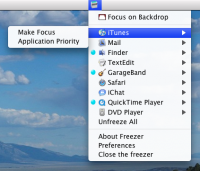
Freezer is an easy way to freeze processor intensive applications to add more processing power to the applications you need.
Freezer is completely safe.
How does it work?
It will freeze/unfreeze applications using the terminal command kill which is a process command used to usually kill applications completely (Force Quit). |
History
0.3
• Fixed memory leaks.
• Fixed crashes.
• Upgraded Sparkle.
• Added Freeze item to sub menu.
0.2
• Blacklist
• Ability to disable freeze when freezing applications
• Ability to change applications priority
• Unfreeze all menu |
Requirements
None |
|
More Screenshots
Downloads: |
12,956 |
Version Downloads: |
3,593 |
Category: |
Utilities |
Released: |
September 1, 2008 |
Updated: |
July 19, 2013 |
Operating System: |
Mac OS X 10.4 Tiger |
Architecture: |
 |
File Size: |
1.08 MB |
Rating: |
| |